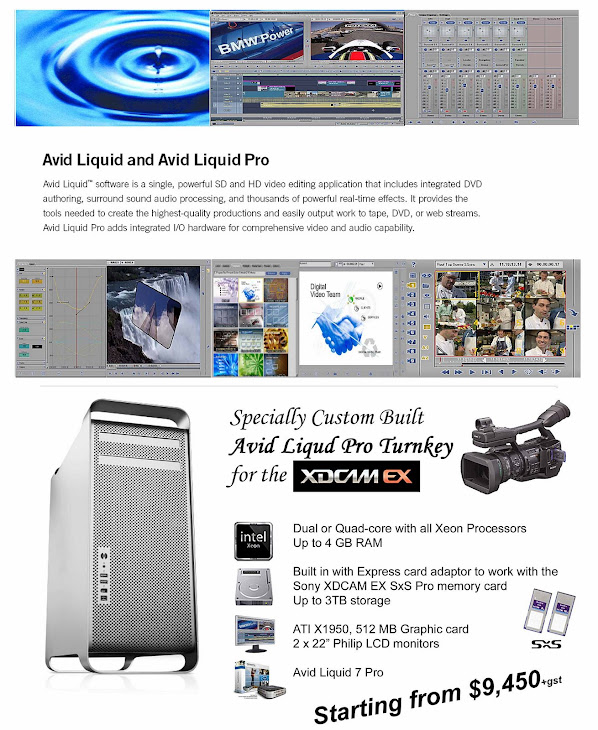
This document describes various ways to import XDCAM material with XReceive into Liquid and how to export XDCAM using the XSend function.
XReceive XDCAM
There are three methods to access XDCAM sources using Liquid’s XReceive feature:
• FTP mode
• File access mode (FAM)
• Proxy editing
FTP mode
You may connect to XDCAM sources on a network using an IP address. Transfer of files is managed via FTP (file transfer protocol).
• Supported codecs are DVCAM and IMX (disk must be formatted for DVCAM or IMX), both in PAL and NTSC as MXF.
• XReceive copies MXF files natively, though audio is saved in WAV format.
Workflow
1. Open File > XReceive
2. Select XReceive from Sony XDCAM (ftp) from the list box
3. Select options as needed
4. Click Ok
5. In the next dialog, select/enter an IP address
6. Click Open to enter username and password
7. Select a destination directory
8. Files found on the remote disk are now displayed
9. Select files for transfer and click Transfer
10. A new rack “XReceive” will be created in the current Project, containing the transferred clip(s)
File Access mode (FAM)
To transfer XDCAM by file access mode over IEEE always use the XReceive module. With standard file import a reliable functionality can not be guaranteed.
• FAM is an iLink based connection which allows the XDCAM drive to be mapped to Windows. (This requires the firmware version 1.1 or greater of XDCAM.)
• Import SMIL edit list. With selecting an Edit XML, the SMIL is imported from the XDCAM and a Sequence is created within Liquid.
Workflow
1. Open File > XReceive
2. Select XReceive from Sony XDCAM (File Access) from the list box
3. Select Media file action > Copy for directly copying the files to the hard disk.
4. A dialog opens. Browse to and select the clips’ XML files for import into Liquid. You will see the metadata contained in the XML in the header of the dialog.
5. Click Ok to start the transfer.
2 of 2
It is also possible to import SMIL EDLs created on XDCAM. Just select the appropriate XML file. This will import the clips and create a Sequence in Liquid.
Note
If the XDCAM disk contains clips with overlapping timecode ranges, make sure that each of these overlapping clips gets a separate Reel name. Otherwise Liquid will not be able to address those clips. You can also import the clips with the standard import function. This way the original timecode will not be considered.
Proxy editing
XDCAM provides a proxy version of the captured media for quick access. With the following workflow proxy editing and subsequent conformity to high resolution media is supported.
Workflow
1. Open File > XReceive
2. Select XReceive from Sony XDCAM Proxy (File Access) from the list box
3. Select clips on the XDCAM storage in the file browser (this imports proxies to the current Rack; the standard process with all XDCAM imports)
4. Create a Sequence and set Timeline Properties > Current Sequence > Min Media Quality to Medium low
Begin editing as usual. When done …
1. Right-click on the edited Sequence in the Rack and select Condense (also check Create master clips in new Rack).
2. In the newly created Rack, select all clips.
3. Then go File > XReceive > … Sony XDCAM (File Access) and click Copy Mark In/Out (a new button that appears at the bottom of the dialog).
With the next refresh of the Timeline all clips will be in high resolution.
XSend to XDCAM
With XSend to… XDCAM files can be recorded back to XDCAM.
Make sure you are using a format supported by XDCAM.
Only Sequences can be xsent.
XSend in IMX format is planned to be supported in a later version.
Workflow:
1. Select the Sequence in the Rack, right-click and select XSend to XDCAM.
2. In the XSend dialog check From Mark In to Mark Out only (if those markers are set), and confirm with Ok.
3. In the browse dialog, select the XDCAM drive and the appropriate folder.
Note:
XSend to XDCAM DVCAM only supports streams consisting of 1 video and 4 audio streams.
You can set the audio streams for Fuse/XSend on the Output Mapping tab in the Liquid Audio Editor.
Make sure that the resulting (fused) clip contains 1 video and exactly 4 audio streams. More than 4 or less than 4 audio streams are not accepted by XDCAM.
Wednesday, June 6, 2007


Imaging Technology with Avid Liquid NAB 2007
Another time, another place and we’re in the purple section that is Avid with Garrick Simeon and Garrick is talking about Liquid as an Avid product and we want to see what the changes in Liquid are for this year.
Garrick: Well we’re releasing version 7.2 which has a whole bunch of new compliant I/O options. The basic and cheapest version of the Liquid product is the straight software only which is for DV and HDV Firewire transfers; sells for about US$699; it’s PC only, requires Windows XP Service Pack 2 and has an enormous amount of features in there designed for the videographer. Here we are showing it set up in three different sections – we’ve got the event videographer, we’ve got the corporate video, for DVD authoring, which is probably output for both corporate and event and, of course, they’re working with HD. And for each of those elements, the Liquid product provides a nice kind of toolset that cuts across the many different incarnations that I’m describing. So, as I said, we’ve got the software only version, then we have the regular Firewire I/O which is the analogue component in and out with the Porsche breakout box.
Ed: Pro – this is the Liquid Pro?
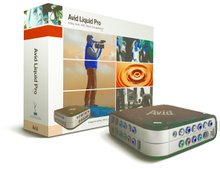
Garrick: That’s the Liquid Pro. So we have Liquid, then we have Liquid Pro and all the features as I said are across both; and then finally we have the Avid Liquid Chrome XE.
The new addition is the fact that now Liquid Chrome XE works with an AJA HD-SDI card, so what you effectively have is all the features from all the other versions of Liquid plus now the option to move to a PCI-E card that goes into your computer and then gives you HD-SDI.
This is the AJA Xena LHE hardware and it’s quite an affordable package to do many I/Os and we’re kind of figuring that a lot of people who have either got the AJA card already from either using Final Cut Pro or something like that, or are looking to just upgrade their Liquid to that as an option will find that it provides the uncompressed HD via HD-SDI plus any of the other conversions or other formats that you can bring in. The codecs that the Liquid include native support for the JVC Progressive formats …
Ed: That’s 25p and 50p?
Garrick: It’s 24p, 25p, 50p and 60p. So that’s excellent. There’s native support for the Panasonic DVCPRO-HD or DVCPRO-100 and that’s with either the P2 card or the Firestore drives; native support for the Canon Progressive formats and it definitely includes the Sony HDV formats – and that’s pretty much the I/Os.
Ed: Well there’s not much else!
Garrick: And continuing, the Liquid Chrome XE has an open timeline, so there’s no transcoding required, you can mix your formats standard def and high definition in real time, native WEVI and mobile formats, native SD and HD, DV, HDV, MPEG-2 i-frame, DVCPRO-HD via a P2, HDCAM, HD, uncompressed standard def and uncompressed high definition and full stream playback on a VGA graphics card.
Ed: So the standard Liquid 7.2 upgrade now includes the Panasonic HD 100 formats?
Garrick: That’s correct. It’s the DVCPRO-100 HD format, so it has support for that.
Ed: This is the standard Liquid?
Garrick: The standard Liquid does the JVC Progressive formats, the Panasonic DVCPRO-HD formats, it has native support for the Canon Progressive formats and also HDV.
Ed: So in the old days, the Chrome was a very expensive option for the Liquid – is this still the case?
Garrick: No, it’s not. The actual software itself is US$995 and the hardware card which you can purchase from any of your AJA distributors, that sells for about US$1,600.
Ed: So basically this gives you the chance to source on HDV or the Panasonic HD Pro format, but edit your programme in virtually an uncompressed or pretty well any compression you like and then output it to a higher format for distribution?
Garrick: Yes. There are many different ways in which you can actually choose your workflow as such or your codecs depending on your job. Typically we recommend that you go with the native formats first, without transcoding it into any uncompressed format and then when you’re done, you can with real time PAL, pretty much go straight out via baseband to HD-SDI if you had an HD-SDI deck for it to go to. So it really depends on the job and what you’re intending to do with it. I mean things like chromakeys, you might need to uncompress – go to fully uncompressed HD just for that part of it, but then again the rest of the project you can have in the native format. So it really depends on what it is you’re intending to do and the effects that you’d like to use. One of the great features I suppose of the whole thing with the Liquid family is that you can author straight to DVD.
Ed: So who are the people who you think should be getting into the Liquid family?
Garrick: Well its pretty much those people who are involved in most of the process of creating the media, like for instance videographers and corporate guys who shoot their own stuff and want to edit their own stuff – so those people who are not on the machine all the time, those who are not like professional editors where it’s all about editing for them. This is the Liquid product, the Avid Liquid, Liquid Chrome XE is really for those who are looking for a higher end option for formats, and are also looking for a lot of effects, a lot of fast effects, a lot of quick turnaround stuff, where quality is important but it’s not paramount and they want to get the product through as soon as possible. So that’s kind of those people, the system – the Liquid range of products is not designed to be networked, they’re stand alone machines. The medium management is not up to the quality that you’d expect, say from the Avid Xpress range upwards for a reason – it’s just not really necessary, and it would add to the cost of the product. So trying to keep it at a very, very affordable price range, but give you the options for stand-alone systems, and we think it does that very well.
Ed: I know that in some of the earlier Pinnacle Liquid range, the interface was a bit of a steep learning curve and in fact turned off a lot of people, but now the interface, well it doesn’t look like an Avid but it’s certainly become a lot easier to use?
Garrick: Yeah, the Liquid guys who are the programmers out of Germany have spent a lot of time kind of trying to make the product easier to pick up and more intuitive for those people, and in specific terms for those people who are not really that interested in the hard core aspects of editing – you know, they just want to get in and get the job done. It’s designed for a fast turnaround solution, so that the editor can then hop out and get back into this car, and drive off and shoot the next whatever it is that he’s doing. And, of course, with the other plug-ins and titles and all the rest of it, it kind of gives the option that you can pretty much customise your own look for each job, and it’s a fast way of doing it – its very much a desk-top editing system.
Ed: So that’s the Liquid range, but for the serious editor and production house that’s needing a lot of editing capabilities, Avid have got other products?
Garrick: Yes, for the career editor, we like to say, we have the Xpress Media Composer and Symphony products in our professional offerings.
Ed: And we will talk about those in another section, thank you, Garrick.
Garrick: My pleasure.
Videoguy Interviews Avid’s Tim Wilson on Avid Liquid 7 NAB 2005
Videoguy: I’m here with Tim Wilson, a long time friend of the Videoguys and the senior product marketing manager at Avid for both the Avid Xpress family and the brand new Avid Liquid 7. Before we go into the exciting new launch of Liquid 7, let’s talk a bit about you. When we first met you, you were at Boris FX. In fact we interviewed you twice for the Insider about those products.
Tim: It’s been just over two years now for me at Avid, and they’ve been amazing, starting with the release of Avid Xpress Pro and Avid Mojo just as I arrived. Just after that came Avid Xpress Studio, the industry’s most complete suite. I know a lot of your customers have been drawn to the software integration between tools like Avid Xpress Pro, Avid Pro Tools and Avid 3D, as well as the hardware integration between Avid Mojo and the Digi 002 audio hardware. There had never been anything like the software and hardware combination of Avid Xpress Studio before, and there’s still nothing even close to this broad and deep a suite on the market.
Videoguy: This has been another wild year, too! Just this past summer at Avid summer camp you gave a dynamite presentation on the new Tiger and HDV releases for Avid Xpress Pro that was the basis of my article. So I guess this makes this your 4th article with Videoguys.
Tim: You’re right, the last few months have been some of the most exciting ever in the Avid Xpress family. It’s been gratifying to see these new releases so well received.
Videoguy: Just before NAB2004 Avid announced they were purchasing Pinnacle Systems, and this past August it all became official. Initially all the press releases talked about the low end/consumer business (Pinnacle Studio) and the Pinnacle broadcast division. There was very little mention of Liquid.
As you know I’ve always been a big Liquid fan, going back to the first time I saw it. Back when it was made by Fast. My hands on review of Edition 5 is one of the most read articles ever on our website . Liquid has very deep roots in the industry and it's only gotten better with age.
When we didn’t hear anything about Liquid following the purchase, there was a ton of speculation in the industry over the future of Liquid, maybe even that it was finished. I guess you answered that with the release of Avid Liquid 7.
Tim: You’ve been talking to me about Liquid for as long as I’ve known you, and some of the features you’ve been most excited about – thousands of real-time GPU-accelerated effects, background rendering, instant auto-save updated 30 times a second, 5.1 audio mixing, and DVD authoring directly from the editing timeline – are exactly the same ones that excite us at Avid.
Videoguy: I can’t help notice that the new version is called Avid Liquid 7. That says a lot to me about Avid’s commitment to the product.
Tim: It absolutely should. The first thing to notice is that this is version 7 of Liquid. The same product management and engineering teams in both Mountain View, CA and Munich Germany that have been responsible for all of the dynamite releases leading up to this one are still very much in place. They’ve produced the best Liquid release yet in Avid Liquid 7.
The second thing to notice is the Avid name in front. We’ve retained the Pinnacle name for the consumer product line anchored by Pinnacle Studio, the best-selling video application in history, with over ten million copies sold. As you’ve noted, though, Liquid is part of the Avid Video division.
When people hear the name Avid, it calls to mind an Oscar and Emmy-award winning company whose customers are responsible for over 90% of Hollywood’s feature films and prime time television. It calls to mind a company whose sole focus is professional editing – the only company in the industry that can say that.
So yes, you’re right, the name Avid Liquid says something very strong about our commitment to not only developing Liquid, but also to talking about it. We want people to know that Liquid and Avid are a very big part of each other’s future.
Videoguy: That is great news. So tell us Tim, what makes Avid Liquid so special?
Tim: Avid Liquid is unique: video, surround audio, DVD, and effects in one application. Not one application for each of those tasks – one application that does it all. Nobody else can say that.
Liquid is also an application built on technology so advanced that the rest of the industry still has a lot of catching up to do. Liquid offers thousands of real-time effects accelerated by reasonably-priced graphics cards. Background rendering. Secondary color correction. The industry’s first native HDV, a year before most of the competition. The ability to mix native HDV with standard def video in the same timeline in real time. Multicamera editing with up to 16 sources – even if they’re different formats. Instant save so you never lose a keystroke. Dolby 5.1 surround encoding and DVD authoring directly in the editing timeline. If you want everything you need in a single application, Liquid is for you.
Videoguy: Since Avid Liquid offers a complete toolset in one application, where does a suite like Avid Xpress Studio fit in?
Tim: Avid Xpress Studio is a suite of best-of-breed, expert applications, each of them with remarkably deep toolsets including Avid Xpress Pro’s industry-leading film editing, based on Avid Film Composer. Avid Xpress Studio plays especially nicely with other expert solutions including Avid Media Composer Adrenaline and Avid Symphony, Digidesign Pro Tools TDM and HD systems, and Softimage XSI.
But we know that not everybody works with film. Not everybody needs to collaborate with multiple users in advanced media networks. And most important, not everybody has the time, money or inclination to invest in multiple expert applications. Sometimes you just need to get work done.
Videoguy: So I guess you can say that Avid Liquid offers the perfect balance. It’s massively powerful, and does everything that most people will need to do, in a single, affordable, easy-to-use application.
Tim: Exactly! But that's not all. Liquid has been built from the ground up to not only run ON Windows, but WITH Windows. We’ve tapped directly in the Windows kernel, including core technologies like Direct X, processing technologies like hyper-threading, and display technologies like OpenGL. As a result, we maximize performance in every way possible. If you’re looking for competition-shredding performance, Liquid is for you.
Videoguy: That sounds like most of my customers! Where do you see Avid Liquid in the marketplace? Who is it designed for?
Tim: There are other ways to answer your question of course. Maybe something as straightforward as “event videographers,” and yes, that’s absolutely one group who’ll love using Liquid. Event videographers are a perfect example of somebody who needs maximum performance for a wide variety of tasks while saving both time and money.
Videoguy: With integrated multicam, DVD burning, secondary color correction and timewarp I see Liquid as the perfect Evetn Videography solution.
Tim: Of course, the same things make Liquid ideal for corporate and government communications, worship, non-profit, even for the high-end enthusiast…anyone, really, with a story to tell, who wants an affordable way to spend more time actually telling the story, and less time managing the tools.
And that’s the bottom line of who Liquid is designed for: someone looking for cutting-edge technology, wrapped in a single, cost-effective, easy-to-use application.
I think that describes many hundreds of thousands of users, doing nearly that many different things. No need to narrow it down from there. One of the things I find most exciting about Liquid is the astonishing variety of people using it, and the uses that they’re putting it to.
Videoguy: It all makes sense to me. Avid Liquid is for any independent videographer. The guy who’s got to get the most bang for his buck, without compromising on features, workflow or stability.
Or cool technology. Speaking of which, what great new features are in version 7?
Tim: One of my favorites addresses a previous gap in Liquid’s feature set, music creation. We’ve got it covered now by building in support for instant soundtrack creation with SmartSound.
Videoguy: We absolutely love that technology at Videoguys. It’s so easy to just define any length at all that you need music for – not just 30 or 60 seconds – and let SmartSound create a custom song for you. And I do mean a song – it’s not a loop, but a song with a beginning, middle and end that you define.
Tim:: By building SmartSound directly into Liquid, the whole process is easier than ever. If you need the soundtrack to be longer or shorter, just adjust the clip right on the Liquid timeline, and SmartSound automatically rebuilds the song for you on the spot.
Videoguy: The SmartSound libraries not only cover every occasion and video style in exactly the length you need, but they come from the industry’s leading production music libraries for top-notch sound. It’s great news to have this built right into Liquid 7. What else do you have for me?
Tim: Native HDV, P2, and XDCam are just a few things that have been part of Liquid for a long time, long before most of the competition. Liquid 7 expands that format lead even further with the ability to edit native DivX and Windows Media 9 files. Notice I didn’t say “export” those formats – although you can. I said “edit.” Natively, without demuxing. The ability to edit, say, WMV files without having to go back to the source files is a massive time savings for folks sending video to the web.
You can even capture your DV footage directly to DivX, as well as MPEG, which offers another huge time savings for folks whose final output is DVD.
And as always, thanks to the Avid Open Timeline, these new formats can be mixed in real time on the same timeline as the formats you’re already using, from DV to uncompressed SD to HDV.
Videoguy: One of the things I've always loved about Liquid is the wide variety of 2D & 3D effects, now we get even more!
Tim: Liquid’s always had great effects, including thousands of real-time effects accelerated by the GPU. Some new ones in Liquid 7 include a new real-time time warp, offering a fast, easy way to create a truly beautiful version of a very popular effect. There’s also a great new image stabilizer to provide a much smoother result from handheld footage.
Liquid 7 also includes over 50 new filters formerly part of the highly regarded Commotion compositing package. They cover a wide range of effects categories, and like all Liquid effects, they render in the background so you never have to stop editing. You don’t even slow down.
There are also all kinds of new features to even further streamline the Liquid editing experience, starting with an even easier-to-use interface, a simplified capture tool, and an option for a single-monitor layout that’s ideal for everything from laptops to high-resolution flatscreen monitors.
Videoguy: You moved pretty quickly past one of the year’s biggest buzzwords, HDV. I know that Liquid had native HDV a long time before anyone else. On top of getting there first, Liquid has a pretty amazing way of dealing with the demands of HDV.
Tim: I already mentioned one of those demands, the need to mix HDV with SD footage, such as archived or customer-supplied footage. Liquid’s Open Timeline makes this a breeze, even if you need to mix HD and SD footage for multicamera editing. Just put it all on the same timeline, and Liquid handles it all in real time, without transcoding.
Another is the need to see your HDV on a video monitor. Now with version 7, you can use your Liquid Pro break-out box to display HD footage on an SD monitor. This is ideal for anyone who doesn’t want to re-outfit every piece of gear at once, and for anyone whose final output for their HD footage is an SD medium such as DVD.
Finally, there’s the need to play back multiple streams of HDV with effects. It’s the way you’ve been editing SD footage for years, so why expect any less for HDV? Other people approach this by asking for more and more CPU power, which is expensive to add. Liquid’s approach is more innovative, as well as more cost-effective: add a better video card with more video RAM. It doesn’t have to be the most expensive card on the shelf, either. It’s certainly the most cost-effective way to boost performance.
Videoguy: For me the most amazing thing about this is that all Avid Liquid needs is a fast computer with standard components. You don’t have to buy an expensive workstation to run it. You can use an off the shelf computer or build your own machine and you’re going to get incredible real-time performance. Just get a fast CPU (or two or dual-core), give it plenty of RAM (2GB or more) and a 256 meg 3D graphics card and Liquid is ready to go. Multiple layers of DV and even with HDV footage in real-time. (Tech Note: For Liquid we recommend ATI graphics cards. Liquid is optimized for the ATI 3D GPU and you will get the highest level of real-time performance using ATI)
Tim: This is absolutely critical. Liquid is itself a high-performance, cost-effective solution, but our ability to wring every drop of performance out of every system component means a lower cost for the entire solution, including the computer.
Videoguy: And as computers get faster, so does Liquid.
Tim: True, but it’s more than that. For example, you can have the same computer, and just add a faster video card. You’ll get a big performance boost from even a small investment. It’s the same theme that we’ve come back to time and again: cutting-edge technology plus reasonable investment equals blazing performance.
By the way, the Avid Liquid system requirements page lays out a variety of options for configurations based on your exact needs, like whether you’re working strictly in SD, or with 720 or 1080 HDV. You’ll get a very good idea about how to balance your budget with your performance requirements.
Videoguy: This is exactly what I love about Liquid, that it can grow with your needs without breaking the bank. Another cost-effective investment is Avid Liquid Pro, the same great software with a really flexible breakout box. You’ve already mentioned that the breakout box can display HD media on an SD monitor. What else can it do?
Tim: It’s designed by Porsche, one of the first names in high performance. Start with the ability to bring in analog formats including composite, S-video and uncompressed component video. Then add digital video, including DV and HDV, and all of it not only captured and output, but simultaneously displayed on a broadcast monitor.
I especially like that it includes a variety of audio connections including SPDIF, and a full set of connections for monitoring your 5.1 surround mix.
It’s an easy connection via USB 2 – which means no conflicts with your FireWire drives – and it looks great.
The last thing I’ll note about the Pro breakout box is that it’s the same one used in Liquid 6, so anyone upgrading from that version just needs to add the new software, and they’re good to go.
I’m very impressed with how fast Avid has been able to not only release a new version, but re-brand the product as Avid Liquid. This tells me that this is just the tip of the iceberg, you’ve got even bigger plans for Liquid down the road. Do you have any last thoughts to share with us about the future of Liquid, Avid and the industry?
Tim: I talked a little about the name Avid as a brand, but I don’t want to forget about the word “avid” as an adjective, either. Developing technologies that help editors is all we do, and we’re excited by it. I’m especially excited by Avid Liquid 7, which will allow us to extend Avid’s reach even further, with the right blend of maximum-performance technology, ease of use, and affordability. Liquid 7 is amazing technology, and an amazing application that really will do it all for an amazing number of people.
Subscribe to:
Posts (Atom)